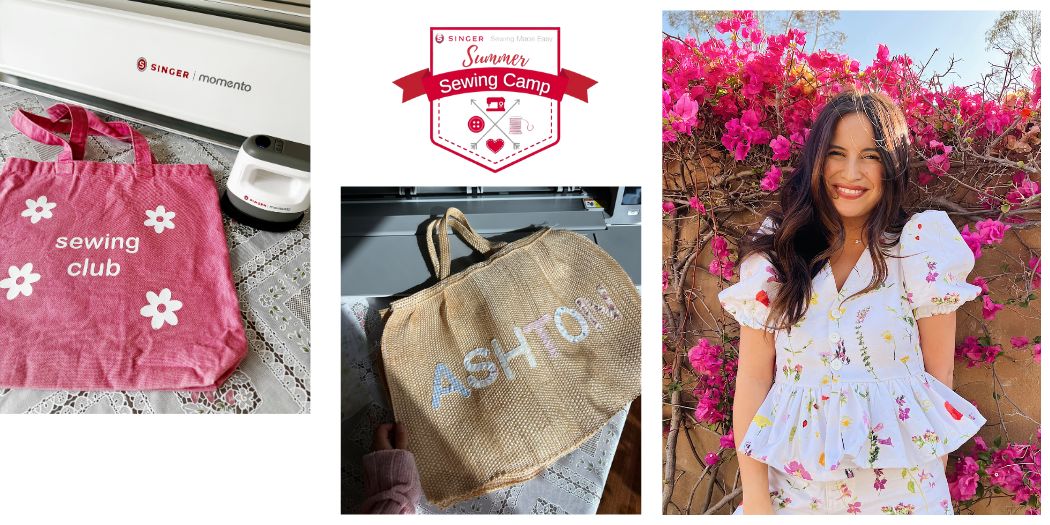
So gestalten Sie Tragetaschen individuell
CREATIVATE Bildung
3. Juli 2025
So gestalten Sie Tragetaschen individuell mit dem „ SINGER® “ MOMENTO™ – HTV- und Applikationstechniken
Eine schlichte Tragetasche lässt sich besonders gut individuell gestalten – sie ist praktisch, fällt ins Auge und bietet unendliche Gestaltungsmöglichkeiten. In dieser Lektion zeigt Ihnen Alissah, Markenbotschafterin von „ SINGER® “, zwei verschiedene Möglichkeiten, wie Sie eine Tragetasche mit der MOMENTO™-Schneidemaschine von „SINGER® “ individuell gestalten können: mit Thermotransferfolie (HTV) und mit Applikationen.
Beide Techniken sind für Anfänger geeignet und liefern Ergebnisse, die ausgefeilt und professionell wirken.
Schau dir Alissahs komplettes Tutorial an
Was Sie lernen werden
Technik 1 – Thermotransferfolie (HTV)
HTV eignet sich perfekt für auffällige, farbenfrohe Designs mit klaren Konturen. Alissah zeigt Ihnen Schritt für Schritt, wie Sie Ihr Motiv in der MOMENTO™-Software entwerfen, es mit der Maschine präzise ausschneiden und es mithilfe einer Heißpresse auf die Tragetasche aufbringen, um ein glattes, professionelles Ergebnis zu erzielen.
Technik 2 – Applikation
Für einen strukturierteren Look mit Stoffakzenten sind Applikationen genau das Richtige. Alissah zeigt Ihnen, wie Sie mit dem MOMENTO™ Stoffstücke „ select “ zuschneiden und anschließend präzise auf die Tragetasche aufnähen – und das Ganze mit Details abrunden, die dem Design einen handgefertigten, einzigartigen Charakter verleihen.
Was Sie benötigen
- Einfache Tragetaschen
- Thermotransferfolie (HTV)
- Verschiedene Webstoffe für Applikationen
- SINGER® MOMENTO™-Schneidemaschine
- Heißpresse
- Sewing Maschine und Faden